
Spoken dialogue
Natural lip-synced voices matched to character emotion, cadence, and room acoustics in a single render.
Make 1080p, 25fps video with synced dialogue and sound, up to 30 seconds. Type a prompt, or drop in a start frame.
Uploaded reference images are used only to run your generation and are deleted automatically within 24 hours.
1 credit ≈ $0.067 · 5s ≈ $2.00 (6 credits/sec) · Minimum top-up $10 (150 credits) · Failed runs auto-refund · Google sign-in on Generate
1080p 25fps 4–30s Native audio Up to 20 references
Independent third-party browser studio for Sand AI’s MAGI-2 model · Not affiliated with or endorsed by Sand AI · Platform & privacy details
Eight real, unedited MAGI-2 clips with native synchronized sound. Every sample displays its exact prompt, mode, duration, and credit cost—click any card to play full stereo audio or load the prompt into the generator.
Generate from text prompts alone, animate stills with Start/End frames, or combine both with up to 20 multimodal references directly in your browser.

“A chilled glass bottle of sparkling lemon water rises out of crushed ice on a black reflective surface, droplets sliding down the glass as a lemon slice drops beside it. Camera: slow orbit around the bottle at eye level.”
Look: studio lighting with a warm rim light, crisp macro detail, dark background. Sound: ice crackling, a soft fizz as bubbles rise, one clean clink of glass; no music.
“Rainy Tokyo narrow alley at night, neon lights reflecting on wet pavement. A young woman with short black hair wearing a red trench coat runs toward the camera, splashing through puddles.”
Camera pulls backward following her through neon reflections on wet pavement. Sound: steady rainfall, footsteps splashing water, distant neon hum.
 Prop · Image
 Light · Still
“Keep the ceramic cup geometry and warm golden sunlight from the image references while the barista pours velvety steamed milk into espresso to form clean microfoam art.”
Camera: locked 85mm shallow depth of field. Match the warm golden cafe palette and synchronize steamed milk pouring with soft room tone and zero music.
MAGI-2 handles text-only generation, image animation, and combined text-plus-media reference workflows inside one browser studio.
| Generation mode | Inputs accepted | Best for |
|---|---|---|
| Text-to-Video | Text prompt only (up to 15,000 chars) | Building original scenes, storyboards, and dialogue shots from scratch when you have no source photos. |
| Image-to-Video & Keyframes | Text prompt + Start image (optional End image) | Animating product photos, locking opening framing, or bridging two exact keyframes smoothly at 1080p. |
| Reference-to-Video (Both) | Text + up to 20 files (10 img, 5 vid, 5 audio) | Holding character identity, props, camera rhythm, and voice/foley timbre across clips—or running targeted clip edits. |
Skip silent clips and tedious sound replacement. MAGI-2 synthesizes spoken dialogue, environmental foley, and background music alongside every 25fps frame.
Natural lip-synced voices matched to character emotion, cadence, and room acoustics in a single render.
Footsteps, pouring liquid, rain, and street ambience lock frame-for-frame to physical motion on screen.
Original tonal underscoring swells and settles with camera movement, saving hours of post-production scoring.
Six production-grade controls inside one focused browser workspace—click Generate with this on any card to preload its prompt and settings.
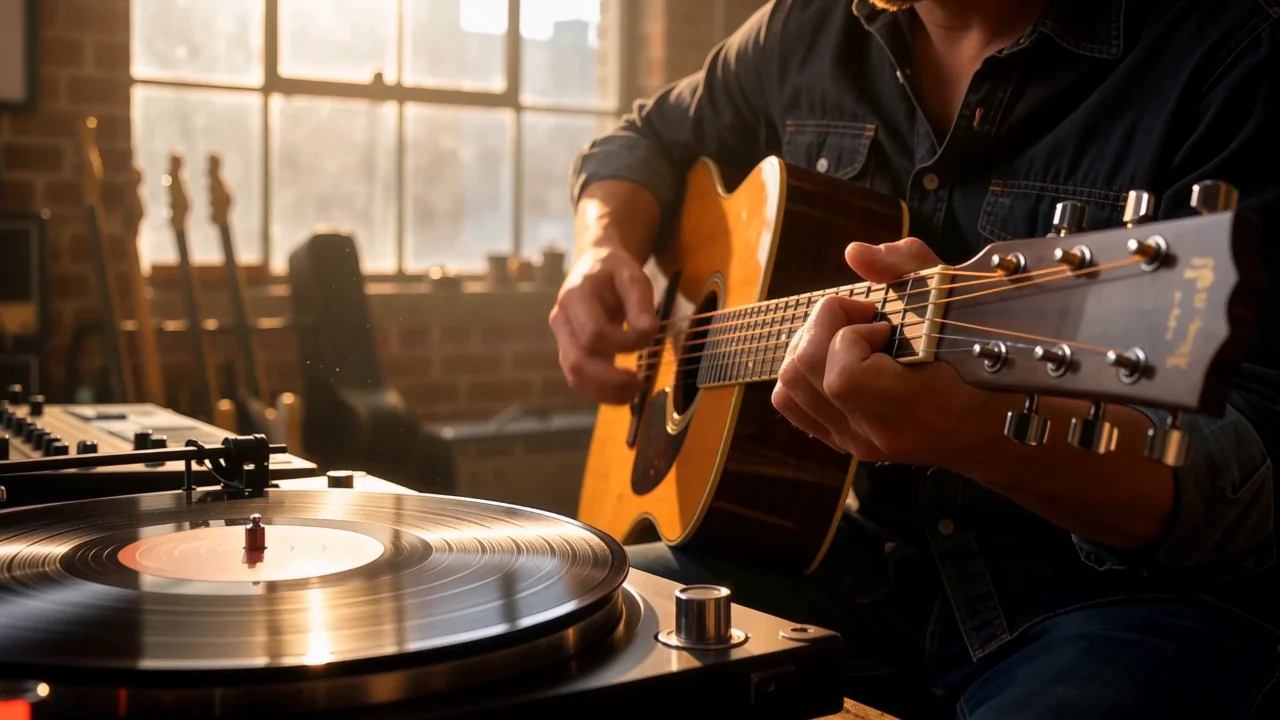
The MAGI-2 video generator synthesizes spoken dialogue, foley impacts, ambient room tone, and underscore in the exact same pass as the 1080p picture. Because audio and motion share one 25fps timeline, lip shapes line up with spoken lines, acoustic guitar strums hit on the exact frame, and room acoustics stay grounded without external post-dubbing. Describe speaker delivery, instruments, and sound effects inside your prompt—or attach reference audio stems—to guide timbre and mix in one render.
Combine up to 20 reference files inside a single MAGI-2 AI Video Generator run: up to 10 images, 5 reference videos, and 5 audio clips in one workspace. Rather than forcing every creative constraint into text alone, supply a product sheet for geometry, a lighting still for color palette, a reference clip for camera orbit rhythm, and an audio stem for foley cadence. Every attached file counts toward the 20-asset ceiling so creative teams always see what drives the shot.
Plan multi-beat scenes from 4 to 30 seconds by scripting camera angles, lens shifts, and cut transitions directly in sequence. Instead of stitching unrelated five-second fragments together, MAGI-2 follows ordered direction—holding smooth dolly push-ins through coastal twilight architecture or shifting from wide establishing shots to tight close-ups while preserving lighting direction and spatial layout on one 25fps timeline.
Anchor both ends of a clip by dropping optional Start and End keyframes into the top slots of the MAGI-2 video generator. When both boundaries are set, MAGI-2 plans the intermediate motion path, camera speed, and lighting shift needed to bridge your opening frame cleanly into your closing frame at 1080p and 25fps across 16:9, 9:16 vertical, or 1:1 square framing. Leave the End slot empty for open-ended image-to-video motion or supply both whenever final-frame composition matters.
Keep facial structure, wardrobe stitching, brand props, and set details steady from the opening frame through the final cut. Upload clean character turnarounds or hero product stills into the reference rail so the MAGI-2 AI Video Generator holds clothing, gear, logos, and handheld objects recognizable even during rapid low-angle tracking shots and heavy particle motion across 4 to 30 seconds.
Revise an existing clip without rebuilding the entire shoot from scratch. Attach your source video as a reference clip and specify the exact regional edit—such as recoloring a red trench coat, swapping a fabric, adjusting weather lighting, or removing a background object—while keeping actor performance, camera timing, motion blur, and synchronized sound intact around the edited region.
Run MAGI-2 directly in your desktop or mobile browser with zero software installation—go from text prompt or reference assets to a clean 1080p MP4 with native sound in minutes.
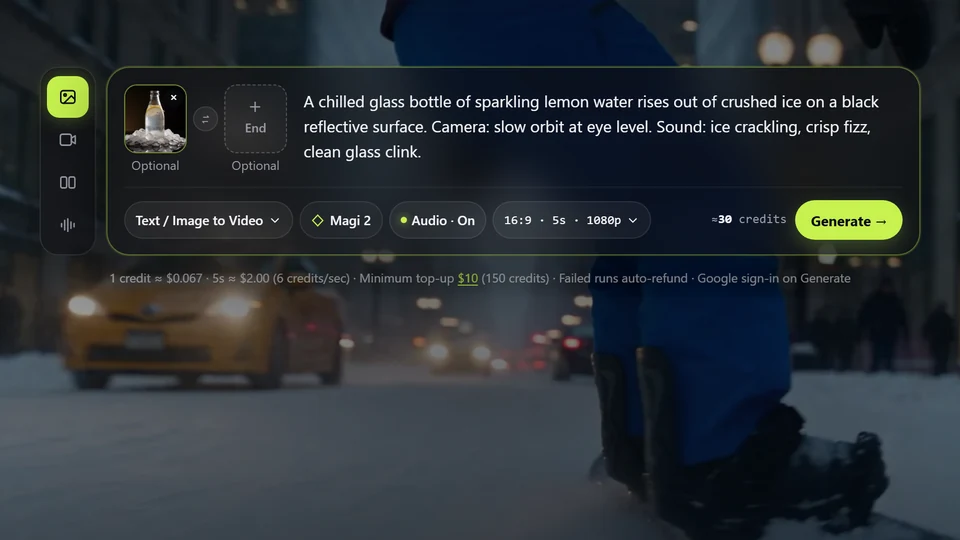
Type a concrete shot description with subject, camera motion, and audio cues—or upload optional Start/End frames and up to 20 multimodal references from desktop or your phone camera roll.
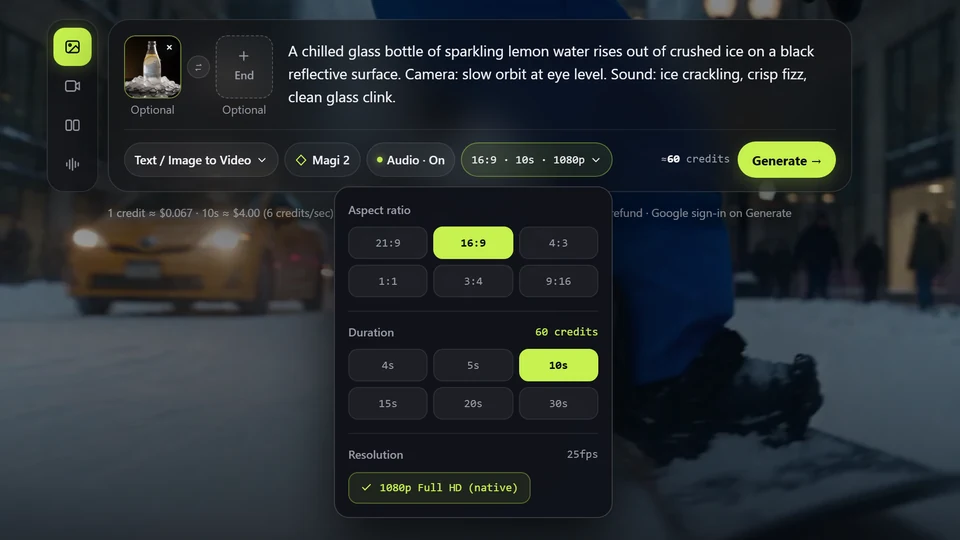
Pick Text / Image to Video, First & Last Frame, or Multimodal Reference, keep synced audio enabled, choose 21:9, 16:9, 4:3, 1:1, 3:4, or 9:16, and set clip length from 4s to 30s at 1080p.
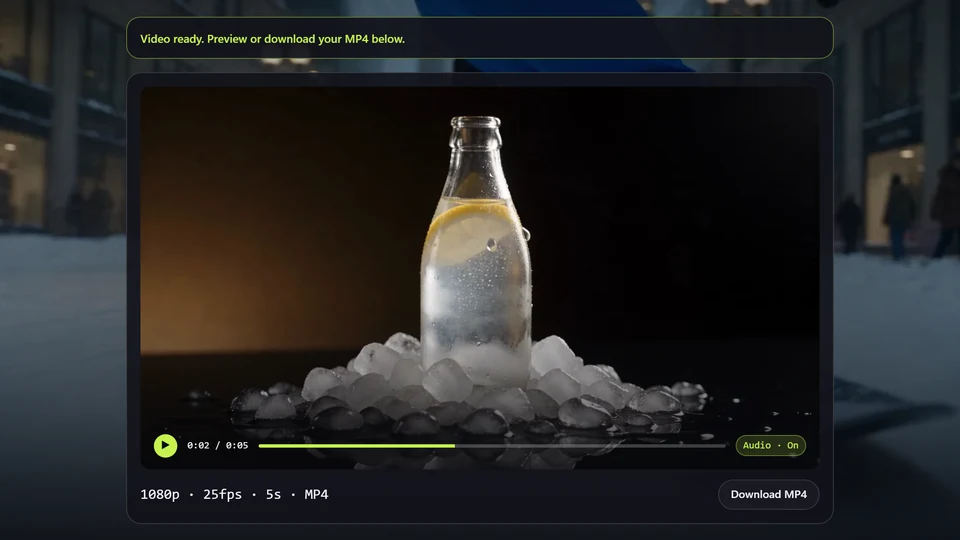
Click Generate, sign in with one-click Google when prompted (no separate signup form), watch your 1080p 25fps clip render on cloud GPUs, and download the watermark-free MP4.
Practical prompt and workflow habits to get sharper motion, cleaner lip-sync, and fewer retakes from MAGI-2.
Describe four elements in order: subject and action, camera movement (such as a slow 35mm dolly push-in), lighting style, and explicit sound or dialogue cues. Clear sequence cues keep multi-second motion steady.
Put spoken words inside quotation marks and specify delivery tone plus background ambience. Add "no music" when you want pure foley and room tone instead of an underscore.
Upload a crisp Start frame (JPG, PNG, or WebP) whenever product geometry or opening layout matters, and add an End frame to anchor closing composition without drift.
Rapid chaotic physics can introduce motion artifacts in long clips. Test complex actions at 4s–5s first, then extend to 10s–30s once camera pacing and subject identity hold cleanly.
From paid social creatives to director treatments, MAGI-2 fits directly into modern production pipelines.
Launch studio-lit tabletop hero spots with crisp tactile foley and consistent packaging details.
Publish native 9:16 hooks with dynamic motion pacing, spoken voiceovers, and ready-to-post sound.
Test lighting mood, lens framing, and spoken dialogue timing before booking crew or locations.
Turn narration scripts, lyrics, and moodboards into rhythmic 1080p visual chapters with native music.
Compare MAGI-2 side by side with Seedance 2.5, Kling 4.0, and Google Veo 3.1 on resolution, clip length, native audio, multimodal references, draft modes, and render speed.
| Parameter | MAGI-2 (Sand AI) | Seedance 2.5 | Kling 4.0 | Google Veo 3.1 |
|---|---|---|---|---|
| Resolution & draft mode | 1080p native @ 25fps (no 480p/720p draft) | Multi-tier presets from fast draft to 1080p | 720p / 1080p modes (Standard & Pro) | 720p / 1080p (Fast & Standard tiers) |
| Single-pass duration | 4–30s continuous single pass | Short-to-mid single-beat clips | 5s–10s per clip (extendable) | ~8s per clip (scene extension supported) |
| Native synced audio | Dialogue, lip-sync, foley & music in one pass | Native audio-visual synthesis for short beats | Supported on select modes | Native spoken dialogue & sound effects |
| Reference inputs | Up to 20 (10 img / 5 vid / 5 audio) | Up to 50 visual & mood-board assets | Subject & Start/End frame control | Reference images & frame anchoring |
| Clip revision & editing | Built-in regional clip revision via video ref | Broad multi-variant regeneration | Motion brush & targeted controls | Scene extension & style-guided edits |
| Typical 5s–10s render time | ~1–4 min (queue dependent; fast queue on Pro/Studio) | Faster low-res drafts before final 1080p pass | Faster on 720p Standard; longer on 1080p Pro | Fast tier returns drafts quickly; Standard takes longer |
| Best workflow fit | Long 10–30s shots, synced dialogue, 20-file ref lock | Large mood-board exploration & fast social drafts | Strong short cinematic & action motion | Quick 8s narrative concepts & Fast-tier iteration |
Objective summary of published input limits, draft-tier availability, and observed render behavior rather than a universal quality ranking. Read the full MAGI-2 vs Seedance, Kling & Veo benchmark →
Magi 2 Play charges a flat 6 credits per second at 1080p and 25fps with synced audio included (24 credits for 4s, 30 for 5s, 60 for 10s, 120 for 20s, 180 for 30s). Start with the one-time Starter Pack ($10 for 150 non-expiring credits) or choose Lite ($12/mo, 200 credits), Pro ($29/mo, 700 credits), or Studio ($69/mo, 1,800 credits)—with 30% off annual plans ($100.80, $243.60, or $579.60/yr). Failed runs auto-refund 100% of credits.
$12 / mo
Yearly: $100.80/yr · ≈$1.80 per 5s clip
200 credits/mo for solo creators making short-form clips.
$29 / mo
Yearly: $243.60/yr · ≈$1.24 per 5s clip
700 credits/mo for active creators, ad teams, and filmmakers.
$69 / mo
Yearly: $579.60/yr · ≈$1.15 per 5s clip
1,800 credits/mo for agencies shipping daily campaigns.
$10 / pack
Was $15 · ≈$2.00 per 5s clip · Never expires
150 credits that never expire — no recurring subscription.
Clear distinction between the MAGI-2 model developer and our independent browser studio, alongside exact retention windows for uploads, generated clips, and account records.
Magi 2 Play (magi2play.com) is an independent third-party web workbench providing paid browser access to MAGI-2. We are not affiliated with, sponsored by, or endorsed by Sand AI.
All transfers are encrypted via HTTPS/TLS, and neither uploads nor finished videos are published to any public gallery by default.
Direct answers on browser and mobile access, sign-in, input modes, render time, daily limits, upload privacy, troubleshooting, and credit billing.
No. Magi 2 Play is a paid credits tool with no zero-cost tier or complimentary credit allowance. Every 1080p clip with synced audio costs 6 credits per second (24 credits for 4s, 30 credits for 5s, 60 credits for 10s, 120 credits for 20s, and 180 credits for 30s). A one-time Starter Pack ($10 for 150 non-expiring credits) covers five 5-second clips or six 4-second clips, while monthly plans are Lite ($12/mo, 200 credits), Pro ($29/mo, 700 credits), and Studio ($69/mo, 1,800 credits), with 30% off annual billing ($100.80/yr, $243.60/yr, $579.60/yr). Failed renders are automatically refunded to your balance.
Yes. Magi 2 Play runs 100% online in your web browser on cloud GPUs, so there is no desktop software, app, or browser plugin to download or install. Because all 1080p video and audio rendering happens in the cloud, you do not need a powerful computer or local graphics card—any modern Windows PC, Mac, Chromebook, or mobile browser works.
Yes. Magi 2 Play works directly inside Safari on iPhone and Chrome on Android with no mobile app required. You can pick photos straight from your phone camera roll as Start frames or references, switch between Text/Image to Video and Reference to Video, select 9:16 vertical or 16:9 widescreen framing, and save finished 1080p MP4 clips directly to your device.
You can open the workbench, browse sample prompts, upload test frames, adjust clip length and aspect ratio, and check exact credit costs without creating an account. When you click Generate, sign in with one click using Google—no separate registration form or password is required—so your credits and finished MP4 library stay synced across devices.
Yes. MAGI-2 supports text-to-video, image-to-video, and combined multimodal reference-to-video in the same composer. Enter a text prompt alone to build a scene from scratch, attach a Start frame (plus an optional End frame) to animate stills with locked framing, or combine text with up to 20 reference files (up to 10 images, 5 videos, and 5 audio clips) for consistent characters, products, and sound.
Yes. MAGI-2 generates synchronized audio in the same pass as the video, including spoken dialogue, environmental foley, sound effects, and background music locked to the 25fps timeline. Audio is enabled by default in the composer bar and can be toggled off whenever you only need a silent visual plate.
A single MAGI-2 generation runs from 4 seconds up to 30 seconds at 1080p and 25fps. Choose 4s, 5s, 10s, 15s, 20s, or 30s inside the composer settings popover, and the credit estimate updates automatically before you generate.
Most 4s to 10s clips render in roughly 1 to 4 minutes depending on duration, reference count, and upstream queue load, while 20s to 30s generations take longer. MAGI-2 renders native 1080p 25fps video with synchronized audio in a single pass and does not include a lower-resolution 480p or 720p draft mode. Pro and Studio plans include fast-queue priority and up to 2 or 3 concurrent jobs.
There is no daily video limit—you can generate as many clips as your credit balance covers. Every render deducts 6 credits per second at 1080p with synced audio included (24 for 4s, 30 for 5s, 60 for 10s, 90 for 15s, 120 for 20s, 180 for 30s). Active concurrency depends on your plan (Lite: 1 job at a time; Pro: 2 concurrent jobs and 30s-max; Studio: 3 concurrent jobs). Starter Pack credits never expire, whereas monthly subscription credits refresh each cycle without rollover.
You can combine up to 20 multimodal reference files in one job: up to 10 images (JPG, PNG, or WebP, up to 5MB each), up to 5 reference video clips, and up to 5 audio clips. You can also assign optional Start and End frames directly inside the composer to lock opening and closing compositions.
Both models generate 1080p video with native audio and suit different production workflows. MAGI-2 is tailored to single-pass 4–30s 25fps shots with up to 20 multimodal references (10 images, 5 videos, 5 audio), first/last-frame anchoring, and targeted clip edits. Seedance 2.5 supports larger reference pools (up to 50 assets) suited to broad visual-board exploration and quick social variants.
If a generation fails due to an upstream error, timeout, or rejected input before a playable MP4 is produced, 100% of deducted credits are automatically refunded. To fix common errors: (1) upload JPG, PNG, or WebP images under 5MB; (2) verify that reference video or audio URLs are publicly accessible links; (3) simplify prompts or replace images that may trigger automated safety moderation; and (4) confirm your credit balance or wait for an active job to finish if you hit your plan's concurrency limit. If a safe clip is falsely flagged or an error repeats, email support@magi2play.com with your account email.
Yes. All uploads and downloads are encrypted over HTTPS/TLS, uploaded reference images are used solely to run your generation and are deleted automatically within 24 hours, and neither your uploads nor your finished MP4s are published to any public gallery by default. Completed videos remain private in your Account page until you delete your account. For your own safety, avoid uploading government IDs, sensitive personal documents, minors, or anyone's likeness without permission; full details are in our Privacy Policy.
Yes. Submitted prompts, uploaded reference images, reference video URLs, and generated videos are screened by automated content moderation before generation and before delivery. Content involving minors, non-consensual likenesses, sexually explicit material, or extreme violence is not permitted. Requests blocked before generation deduct zero credits. Automated checks are probabilistic and may occasionally produce false positives—if a safe prompt is rejected or a generated clip is held by output review, email support@magi2play.com with your account email for a manual review and credit adjustment. Full rules are listed under Acceptable Use in our Terms of Service.
You retain ownership and commercial usage rights to the videos you generate from your own prompts and uploaded materials on Magi 2 Play, provided your inputs respect third-party copyrights, trademarks, and safety rules. Uploads and generated clips are not published to a public gallery by default.
Magi 2 Play focuses on the browser-based studio so creators can upload references, check credit estimates, and download watermark-free MP4 clips without writing integration code. For direct programmatic API access to MAGI-2, check Sand AI or supported third-party model API gateways.
Dive deeper into step-by-step prompting, photo animation, mobile rendering, troubleshooting, and side-by-side model benchmarks.